Product walkthrough · Lead automation for clinics
Every ad lead answeredin seconds,and booked while you sleep
PawFlow is a lead system I designed for clinics that run Facebook and Instagram ads. Leads land on a dashboard by themselves, get a WhatsApp reply from an approved template within seconds, are followed up on a schedule if they go quiet, and are answered and booked by an AI agent at any hour. This post walks through every screen and how it works.
In one minute
- Leads from Meta lead forms and Click-to-WhatsApp ads land on the dashboard by themselves, with the ad they came from.
- Each one gets a WhatsApp reply from a Meta-approved template within seconds, at any hour.
- If they don’t reply, a follow-up flow sends up to two more messages on a schedule, then stops.
- When they do reply, an AI agent answers, offers real free slots and books. Anything medical goes to the vet.
- In Thailand the same system runs on LINE, because that is where Thai customers are.
Who this is for
Clinics, groomers, salons and other booked businesses that pay for ads and then lose leads because nobody replied fast enough, or nobody followed up.
Try the demo as you read. Every screenshot below comes from it.
Jump to the benefitsOn this page
- Three markets, three chat apps
- The morning screen: what happened overnight
- Every ad lead lands on its own
- The first reply goes out in seconds
- Follow-ups that stop when they should
- An AI agent that answers and books
- Knowing when to hand over
- Bookings that show who made them
- LINE for Thailand
- It works on your phone
- What it changes, problem by problem
- How it gets built for your business
- Things you can do this week, with or without automation
- Questions people ask
Here is how ad leads usually go for a small clinic. Someone sees a grooming offer on Instagram at 11 pm, fills in the form and goes to sleep. The clinic opens at 9. The receptionist works through the list at 11, between walk-ins. By then the person has booked somewhere else, or forgotten why they filled in the form at all.
The ad did its job. The money was lost in the gap between the lead arriving and someone answering. A widely cited study of online leads found that firms that replied within an hour were nearly seven times as likely to qualify the lead as firms that waited longer (Oldroyd, McElheran & Elkington, 2011). Most clinics are nowhere near an hour, and they are closed for half the day.
PawFlow closes that gap. It has seven screens. Below is each one in the order a lead meets it, with the screenshot, how it works and what it does for the business.
PawFlow is a working design demo with sample data. The clinics, customers, prices and AI replies are fictional placeholders, and nothing is saved or sent. For a client, it is connected to their real Meta ad account, their WhatsApp Business Platform number or LINE Official Account, and their real booking calendar.
Feature 01
Three markets, three chat apps
An automated reply only works if it arrives in the app the customer actually opens. That app is not the same everywhere. So the demo has a Show as switch at the top with three clinics, and the whole system changes with it: name, colours, currency, prices, tax, payment method and, most importantly, the messaging app.

| Clinic | Messaging | First message | Payments |
|---|---|---|---|
| Pet clinic, Kolkata | Approved template | UPI | |
| Pet clinic, Singapore | Approved template | PayNow | |
| Pet spa, Bangkok | LINE | Greeting card after they add you | PromptPay |
In India and Singapore, nearly every customer already has WhatsApp open all day, so that is where the reply goes. In Thailand, LINE is the everyday chat app: LY Corporation reports about 54 million monthly users there, around four in five people in the country. A Thai clinic that answers on WhatsApp is asking customers to switch apps, and most won’t. LINE works differently from WhatsApp, so it gets its own section below.
For the business: the reply lands in the app the customer reads first, so it gets seen, not buried.
Feature 02
The morning screen: what happened overnight
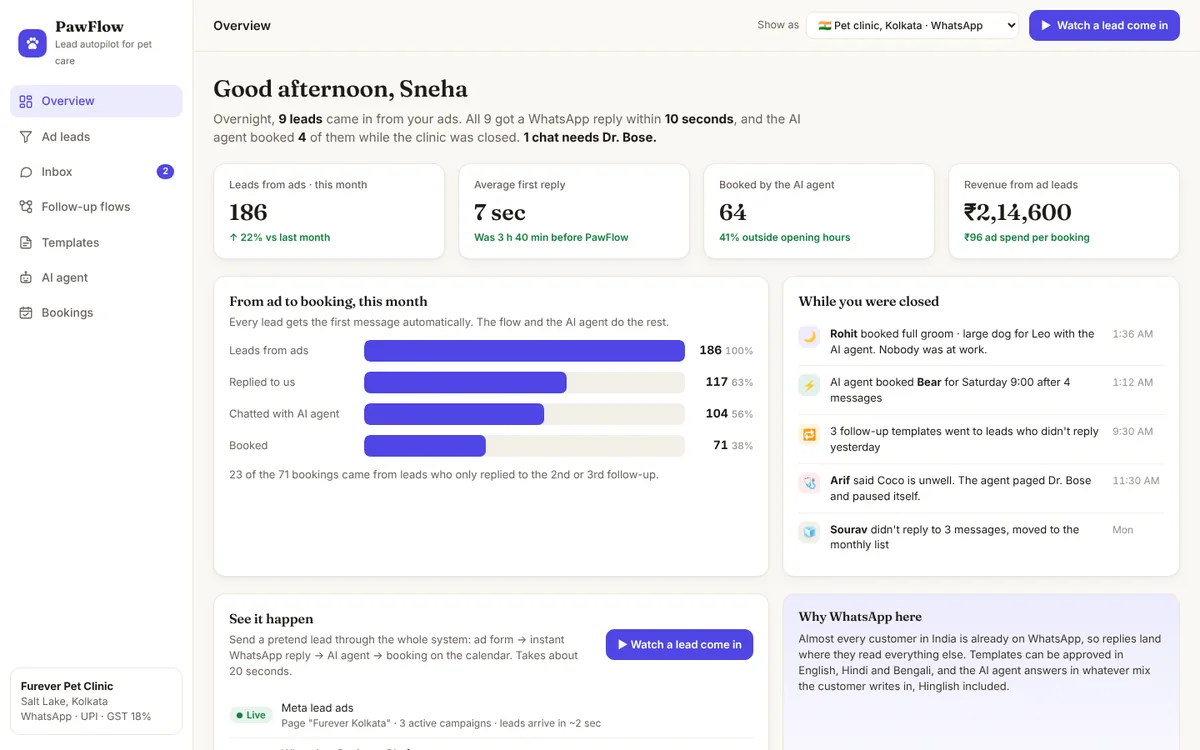
The overview is written for the owner opening it at 9 am. One sentence tells you what happened while the clinic was closed: “Overnight, 9 leads came in from your ads. All 9 got a WhatsApp reply within 10 seconds, and the AI agent booked 4 of them while the clinic was closed. 1 chat needs Dr. Bose.”
Below that are four numbers: leads from ads this month, the average first reply (7 seconds, against 3 hours 40 minutes before), bookings made by the AI agent and revenue from ad leads, with the ad spend per booking underneath. Then a funnel from lead to booking, and a feed of what happened while you were away.
How you use it
- Read the one-line summary. If it names a person (“1 chat needs Dr. Bose”), that is your first job.
- Check the average first reply. If it ever climbs, something is disconnected.
- Look at the ad spend per booking. That is the number to compare between campaigns.
- Press Watch a lead come in to see the whole thing happen with a pretend lead in about 20 seconds.
For the business: you see what your ads actually produced in bookings, not just in clicks, and you know in ten seconds whether anything needs you.
Feature 03
Every ad lead lands on its own
Nobody downloads a spreadsheet from Ads Manager. When someone submits a Meta lead form, or starts a chat from a Click-to-WhatsApp ad, Meta sends the lead straight to PawFlow within a couple of seconds. It arrives with the person’s name, phone number, the pet’s name and breed from the form, and the ad and campaign it came from.

The last column is the useful one. Instead of a vague status like “contacted”, it says what happens next and when: “Step 2 of 3 · next last_chance_offer in 2 days”. Filters along the top split the list into Booked, Chatting, In follow-up, Needs staff and Cold, so the receptionist only ever looks at the ones that need a person.
For the business: no lead sits unseen in Ads Manager, and you can see which ad brings people who actually book.
Feature 04
The first reply goes out in seconds
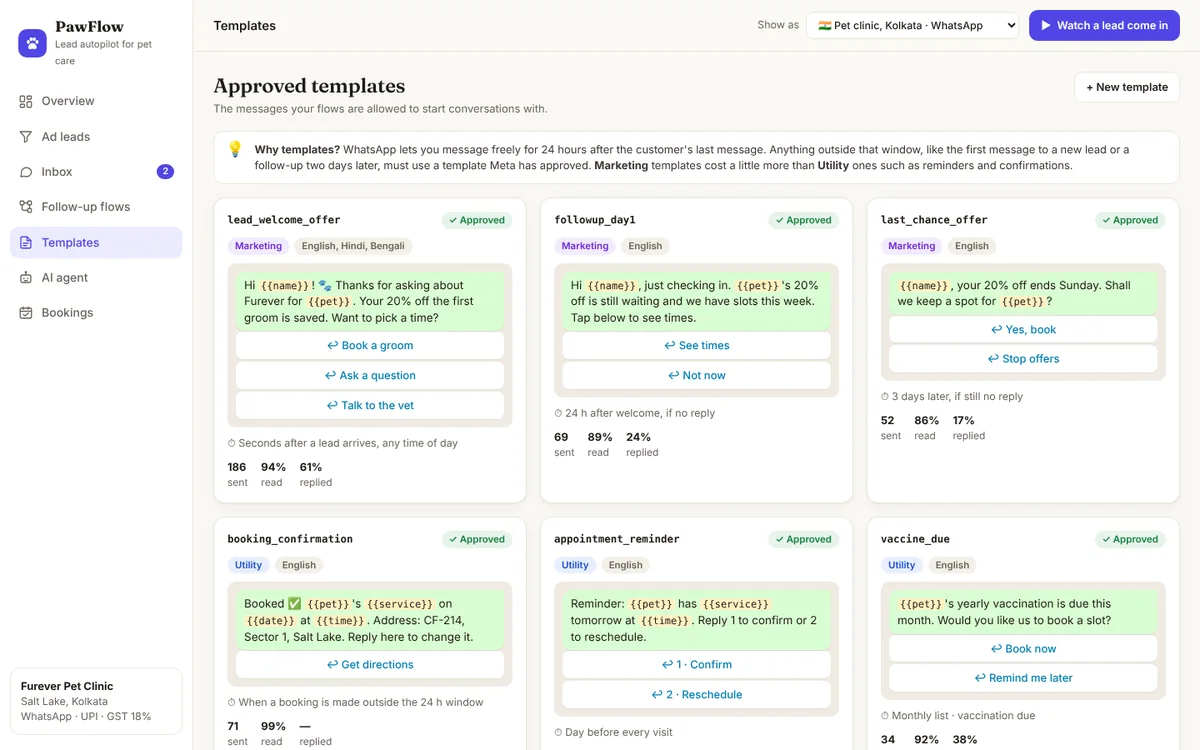
WhatsApp has one rule that shapes everything here. A business can reply freely for 24 hours after the customer’s last message. Outside that window, including the very first message to someone who filled in a form, the business can only send a template: a message written in advance and approved by Meta.
So the first reply is an approved template called lead_welcome_offer. It goes out within seconds of the lead arriving, at 2 am as readily as at noon, with the customer’s name, the pet’s name and the offer they clicked on, plus three quick-reply buttons.
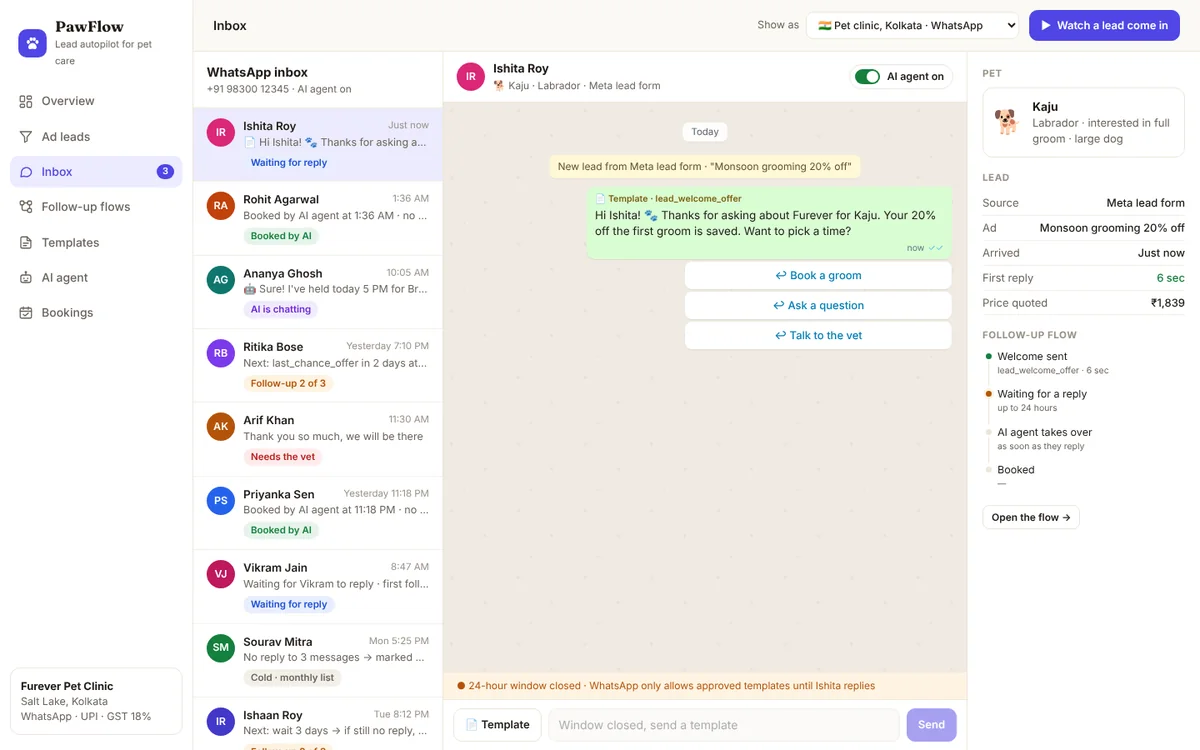
The buttons matter. Tapping one counts as the customer writing back, which opens the 24-hour window. From then on, the AI agent can reply in normal conversation. A bar under every chat shows whether the window is open, and when it is closed the message box locks and only offers templates, so nobody on the team can accidentally break the rule.
For the business: every lead you paid for gets answered while they still care, including the ones who enquire after closing time.
Feature 05
Follow-ups that stop when they should
Many leads don’t reply to the first message. They were busy, or they meant to come back to it. The follow-up flow handles them on a schedule, so nobody has to remember. The Follow-up flows screen draws it as a diagram you can read top to bottom.

After the welcome template, the flow waits up to 24 hours and then splits:
- They replied: the AI agent takes over, books, sends a confirmation and a reminder the day before the visit.
- No reply:
followup_day1the next morning at 9:30, then a two-day wait, thenlast_chance_offerat 10:00. If there is still no reply, the lead moves to a monthly list that only gets things like vaccination-due reminders and seasonal offers.
Three rules sit under the diagram, and they matter as much as the flow itself:
- It stops the moment they reply. Any reply cancels the remaining follow-ups, so nobody gets a “last chance” message in the middle of a conversation.
- “Stop offers” means stop. Tapping it removes the person from every marketing message. Reminders for real bookings still go out.
- Quiet hours. Follow-ups wait for 9:30 am local time. Only the instant welcome and booking replies go out at night, because the customer has just written.
Press Play: lead replies or Play: lead goes quiet in the demo to watch a lead travel down either path with a clock showing the day and time of each step.
For the business: leads that would have gone cold get two more polite chances to book, without anyone remembering to chase them and without annoying anyone.
Feature 06
An AI agent that answers and books
Once a lead writes back, someone has to answer their questions and find them a time. In most clinics that someone is also answering the phone and checking pets in. The AI agent, called Pip in the demo, does it instead, at any hour, in the customer’s own language.
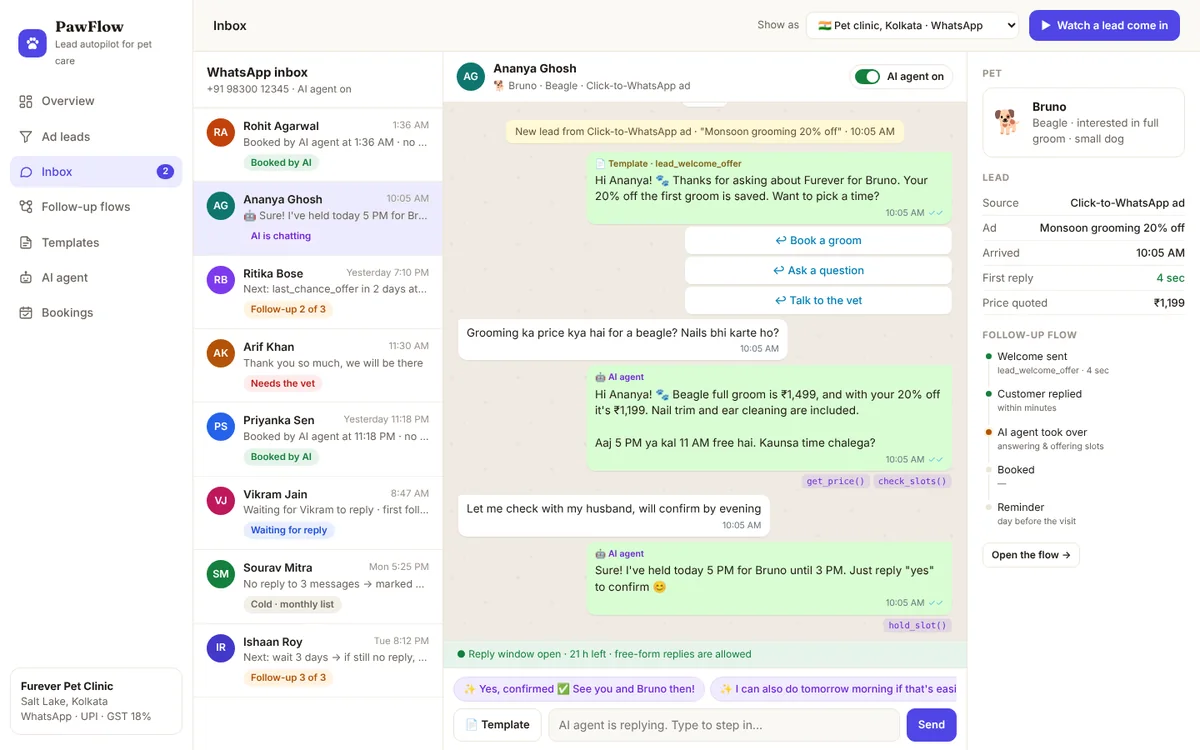
The AI agent screen sets out exactly what it is allowed to do:
- It can: answer prices, timings, location and parking; check the real calendar for free slots; book, move and cancel appointments; send the booking card; hold a slot for a few hours; reply in the customer’s language.
- It never: diagnoses or suggests medicine, promises a price that isn’t on the list, argues with an unhappy customer, or messages anyone who tapped “Stop offers”.
It works from the clinic’s own price list and calendar, which are on the same screen. Small purple labels under each reply, like check_slots() and create_booking(), show which action it took, so staff can see it is reading the real calendar and not making up times.
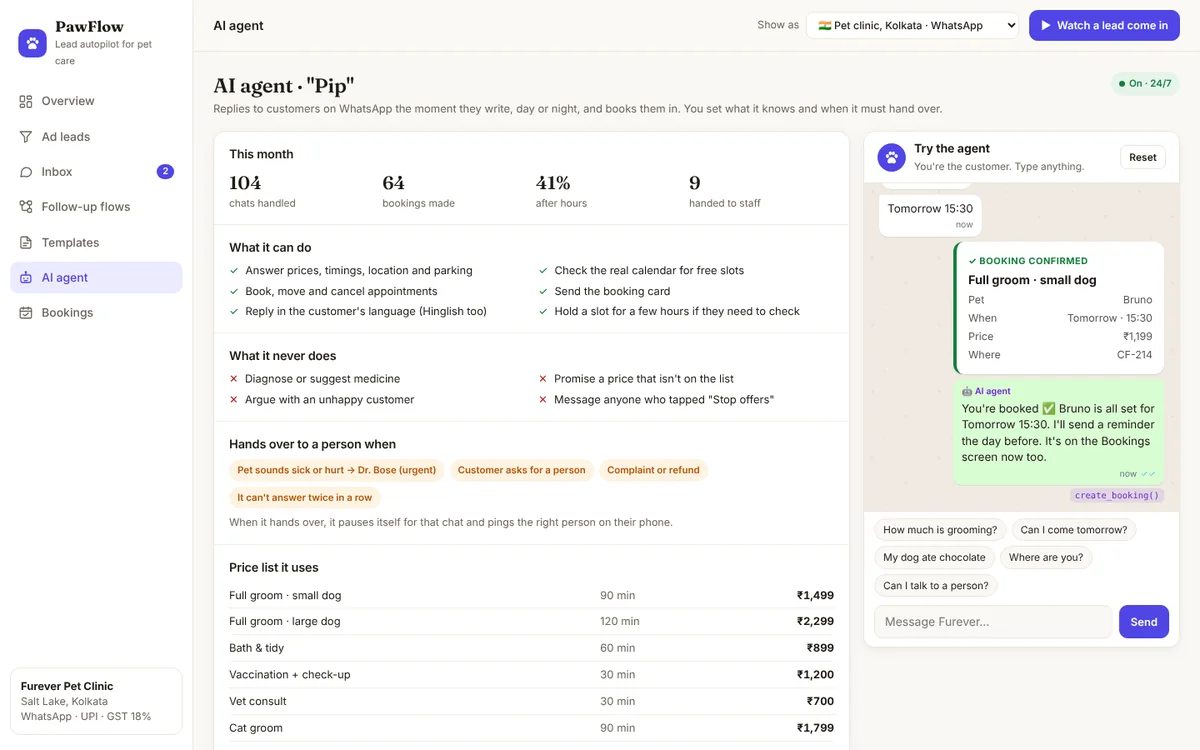
You can talk to it in the demo. Ask the price, tap a slot, and the booking appears on the Bookings screen. Type “My dog ate chocolate” to see what happens when something is urgent.
For the business: questions get answered and slots get filled at 2 am, during the lunch rush and on your day off, without adding staff.
Feature 07
Knowing when to hand over
An AI agent at a clinic is only safe if it knows what it must not handle. PawFlow hands a chat to a person when the pet sounds sick or hurt, when the customer asks for a person, when there is a complaint or a refund, or when it can’t answer twice in a row.
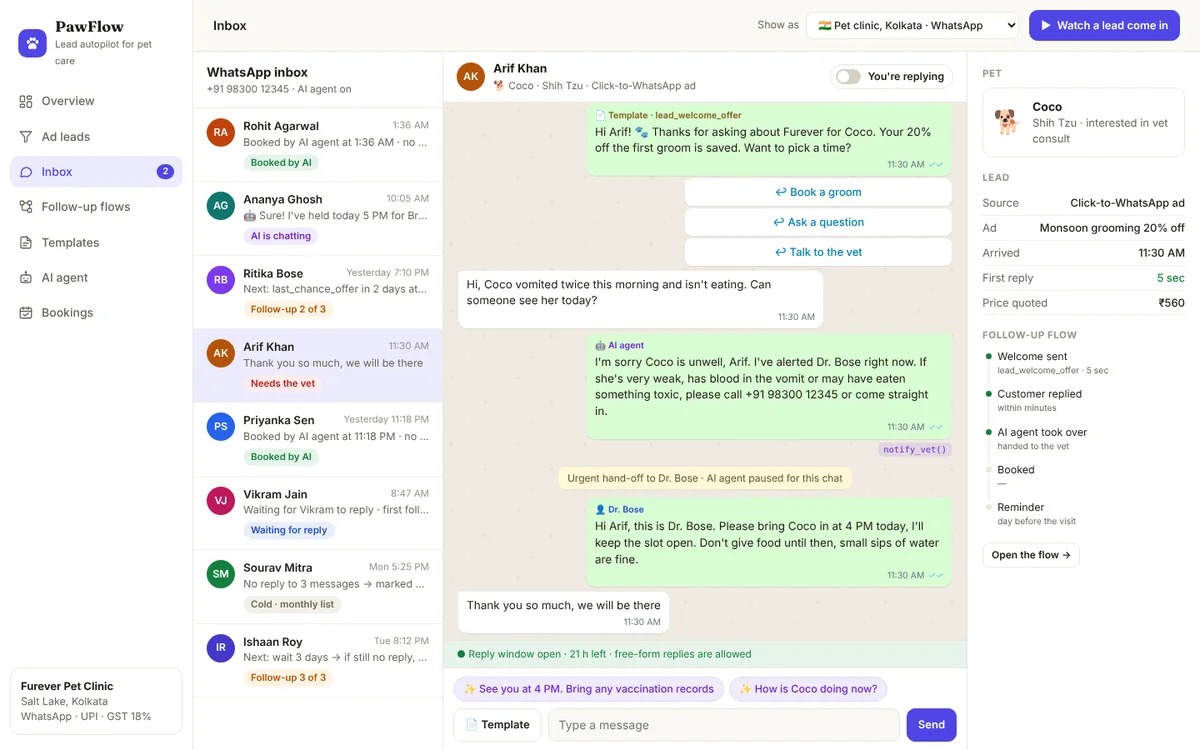
When it hands over, three things happen: the right person gets a notification on their phone, the agent switches itself off for that chat, and a yellow line in the chat records why. The switch at the top of every chat works the same way for staff. Type a reply yourself and the agent goes quiet until you switch it back on.
For the business: the routine questions are automated and the serious ones reach a person faster than they would through a busy front desk.
Feature 08
Bookings that show who made them
The bookings screen is a plain three-day calendar, with one difference: every appointment carries a label saying who made it. “AI agent · 1:12 AM”, “Template button”, “Staff” or “Dr. Bose · urgent”.
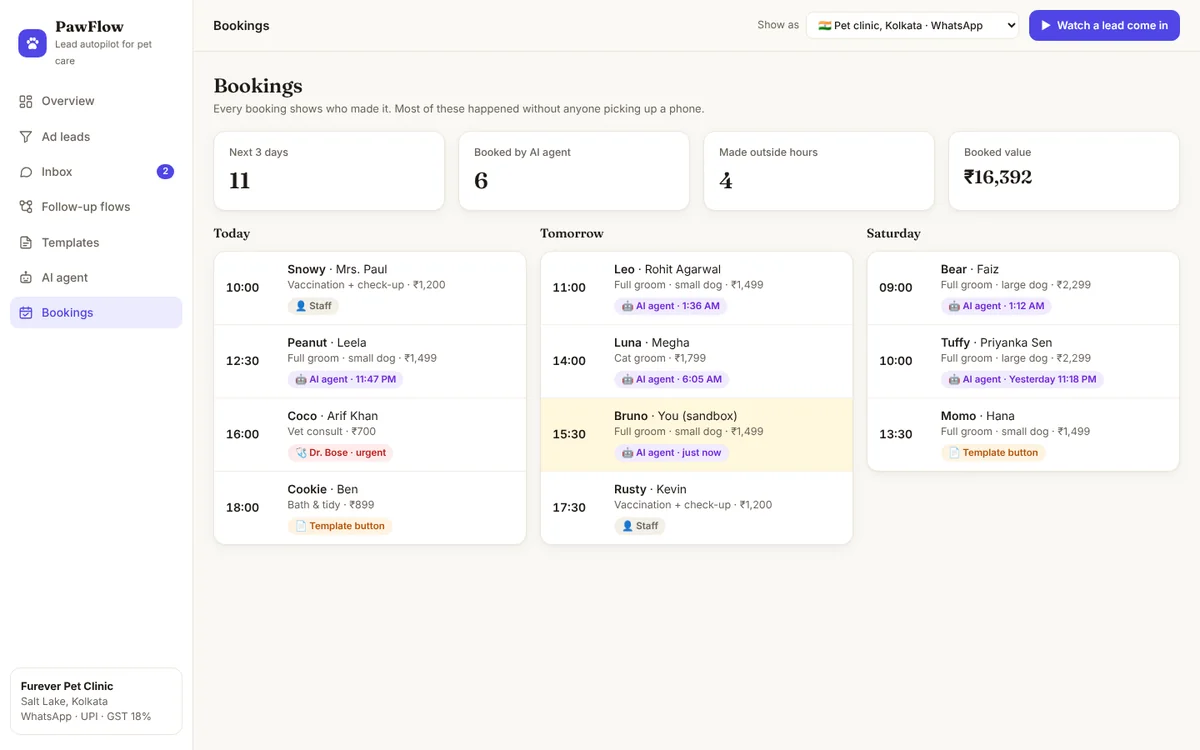
Every booking gets a confirmation straight away and a reminder the day before (appointment_reminder), with buttons to confirm or reschedule. A reschedule goes back to the agent, which offers new slots.
For the business: you can see how much of the diary the system filled on its own, and fewer of those slots end up empty.
Feature 09
LINE for Thailand
Switch the demo to the Bangkok pet spa and the inbox turns into LINE: blue background, rounded bubbles, Thai text with an English translation under each message for staff who need it, and booking cards with a PromptPay deposit button.
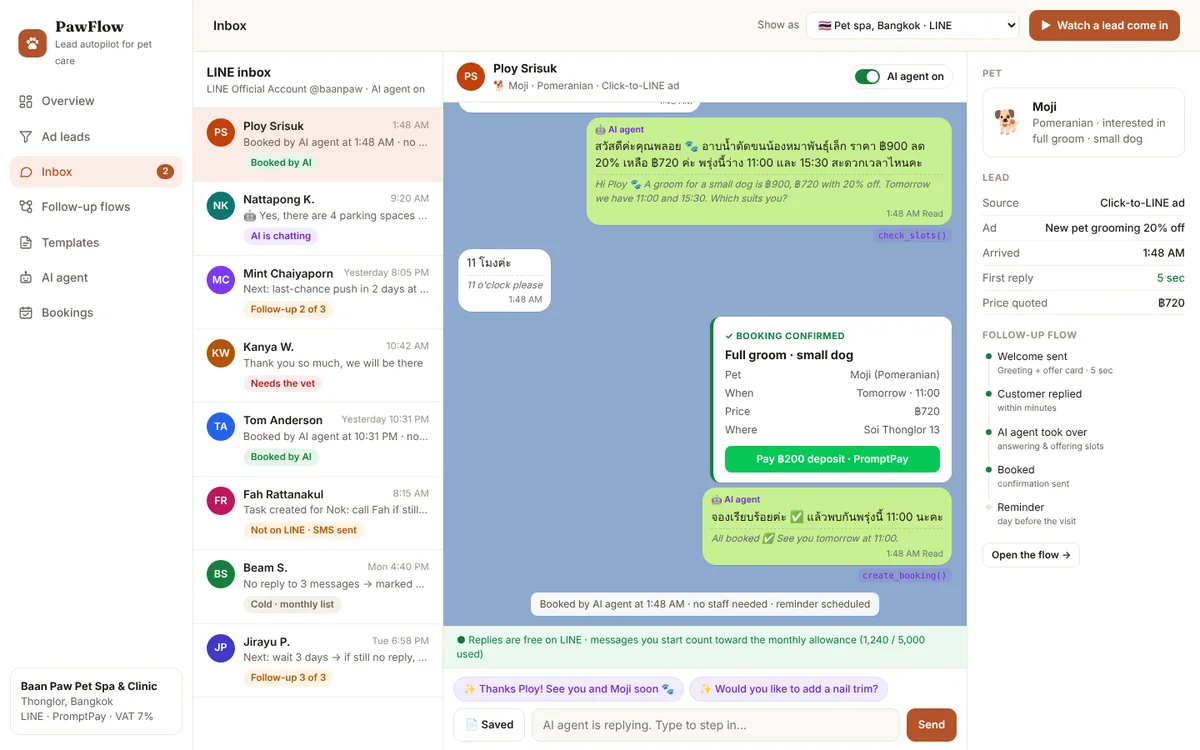
LINE differs from WhatsApp in two ways that change the flow:
- No templates to approve, but you can’t message a phone number. A LINE Official Account can only message people who have added it. So the ad’s first job is to get that “Add”: the Click-to-LINE ad or the form’s thank-you screen has an Add us on LINE button, and the greeting card goes out the moment they tap it.
- Replies are free; messages you start count. LINE doesn’t count replies to a customer’s message against your plan. Messages you start yourself, like follow-ups and reminders, count towards your plan’s monthly allowance. The bar under each chat shows how much of it you have used.

Some people fill in the form and never add the account. For them, PawFlow sends a single SMS with the LINE link 15 minutes later, and if they still haven’t added it by evening, it creates a call task with their details. One SMS, never more.
For the business: a Thai clinic gets the same instant replies and AI bookings, on the app Thai customers actually use, with deposits paid the way they normally pay.
Feature 10
It works on your phone
Clinic owners are on the floor, not at a desk. Every screen works on a phone: the sidebar becomes a tab bar at the bottom, the numbers stack two by two, chats open full screen with a back button, and the flow diagram scrolls sideways.

For the business: you can check overnight bookings, step into a chat or answer the vet’s hand-off from between appointments.
The benefits
What it changes, problem by problem
Here is every feature mapped to the everyday problem it solves.
| The problem | What PawFlow does | What you get |
|---|---|---|
| Leads sit in Ads Manager | Leads land on the dashboard by themselves, with the ad they came from | Nothing goes unseen |
| Slow first reply | An approved template goes out within seconds, any hour | Leads hear from you while they still care |
| Leads enquire after closing | The AI agent answers and books at night | Bookings made while you sleep |
| Nobody follows up | A scheduled flow sends two polite follow-ups, then stops | Quiet leads get more chances to book |
| Follow-ups feel pushy | Stops on reply, quiet hours, a “Stop offers” button | Customers stay willing to hear from you |
| Same questions all day | The agent answers prices, timings and location from your list | Front desk freed up |
| Urgent cases buried in chats | Medical words trigger an instant hand-off to the vet | Serious cases reach a person faster |
| Breaking WhatsApp’s rules by accident | The 24-hour window is shown and enforced in every chat | Your number stays in good standing |
| No-shows | Reminders with confirm and reschedule buttons; deposits on LINE | Fewer empty slots |
| Not knowing which ad works | Ad spend per booking, by campaign | Money goes to ads that book |
| Wrong app for the market | WhatsApp in India and Singapore, LINE in Thailand | Replies get read |
Getting started
How it gets built for your business
PawFlow is not a subscription you configure yourself. I build it around your clinic, connect it to your accounts and hand it over working. A typical project runs like this:
- Map your services and rules. A call to write down your services, prices and durations, opening hours, who handles what, and when the agent must hand over.
- Connect your ads. Your Meta ad account and Facebook Page, so lead forms and Click-to-WhatsApp chats arrive on their own. The form asks permission to message on WhatsApp.
- Connect your messaging. Your number on the WhatsApp Business Platform, or your LINE Official Account in Thailand, after Meta business verification where needed.
- Write and approve the templates. I write the welcome, follow-up, confirmation and reminder templates in your languages and submit them to Meta for approval.
- Connect your calendar and train the agent on your price list, policies and hand-over rules, then test it with real questions before it talks to a customer.
- Train the team. A short session on stepping into chats and handling hand-offs, plus a written guide in plain words.
Most builds take three to five weeks at a fixed price agreed before any work starts. Meta’s and LINE’s own messaging charges are paid directly to them, and I show you what to expect before you go live.
Your turn
Things you can do this week, with or without automation
You don’t need new software to use most of these ideas. Start with the ones that cost nothing.
- Check how long your last ten ad leads waited for a first reply. Write the number down.
- Download new leads from Ads Manager at least twice a day, including once in the evening.
- Write one short first message with the customer’s name, their pet’s name and the offer they saw. Save it as a quick reply.
- Offer two specific times in every reply instead of asking when they’d like to come.
- Follow up once the next morning and once three days later, then stop.
- Make a list of words that mean “send this to the vet now”, and share it with whoever answers chats.
- Send a reminder the day before every appointment, with an easy way to reschedule.
- If you’re in Thailand, put an “Add us on LINE” button on every ad and thank-you page.
Questions
Questions people ask
Is it allowed to message ad leads automatically on WhatsApp?
Yes, when the person has agreed to hear from you on WhatsApp and the message uses a template Meta has approved. The lead form includes that permission, every marketing template has a Stop offers button, and anyone who taps it is never sent a marketing message again.
What does WhatsApp messaging cost?
Meta charges per template message, and the rate depends on the country and on whether the template is marketing or utility. Replies inside the 24-hour window cost far less, and chats that start from a Click-to-WhatsApp ad come with a free messaging period. Meta changes its rates from time to time, so I check the current rate card for your country when I quote.
Can it use my existing WhatsApp number?
Usually, yes. The number is registered on the WhatsApp Business Platform, which means it moves off the ordinary WhatsApp Business app. I handle the setup and tell you up front if anything about your current number needs to change.
Will the AI agent give medical advice about my customers’ pets?
No. It answers questions about prices, timings, location and bookings. Anything that sounds like a sick or injured animal goes straight to the vet, and the agent pauses itself for that chat.
Can my staff take over a chat?
Yes. Every chat has a switch. The moment a staff member types a reply, the agent goes quiet for that chat until someone switches it back on.
Does it work for businesses other than pet clinics?
Yes. Any business that runs ads and takes bookings works the same way: salons, clinics, gyms, coaching classes, home services. The templates, price list and hand-over rules change; the flow stays the same.
Further reading
Sources and further reading
The research and platform rules mentioned in this post:
- Oldroyd, J. B., McElheran, K. & Elkington, D. (2011). The short life of online sales leads. Harvard Business Review.
- Johnson, E. J. & Goldstein, D. (2003). Do defaults save lives? Science.
- Brehm, J. W. (1966). A Theory of Psychological Reactance. Academic Press.
- Iyengar, S. S. & Lepper, M. R. (2000). When choice is demotivating: can one desire too much of a good thing? Journal of Personality and Social Psychology.
- Gurol-Urganci, I. et al. (2013). Mobile phone messaging reminders for attendance at healthcare appointments. Cochrane Database of Systematic Reviews.
- Meta for Developers: WhatsApp Business Platform pricing.
- LY Corporation: LINE outside Japan (monthly users in Thailand).
- LINE Developers: Messaging API pricing.